Why an Event Shouldn’t Belong to Just One Calendar
Most calendar apps force every event into one calendar. Learn why that creates duplicates, sync problems and awkward sharing — and what a linked-event model changes.
Most calendar applications are built around a simple assumption: an event belongs to one calendar.
When you create dinner plans, you choose Personal. When you schedule a work meeting, you choose Work. When you add a family trip, you choose Family.
It is an intuitive model. Calendars behave like folders, and events are the things stored inside them.
That works surprisingly well until a plan belongs to more than one part of your life.
And many plans do.
Real life does not fit neatly into folders
Imagine a dinner on Friday evening.
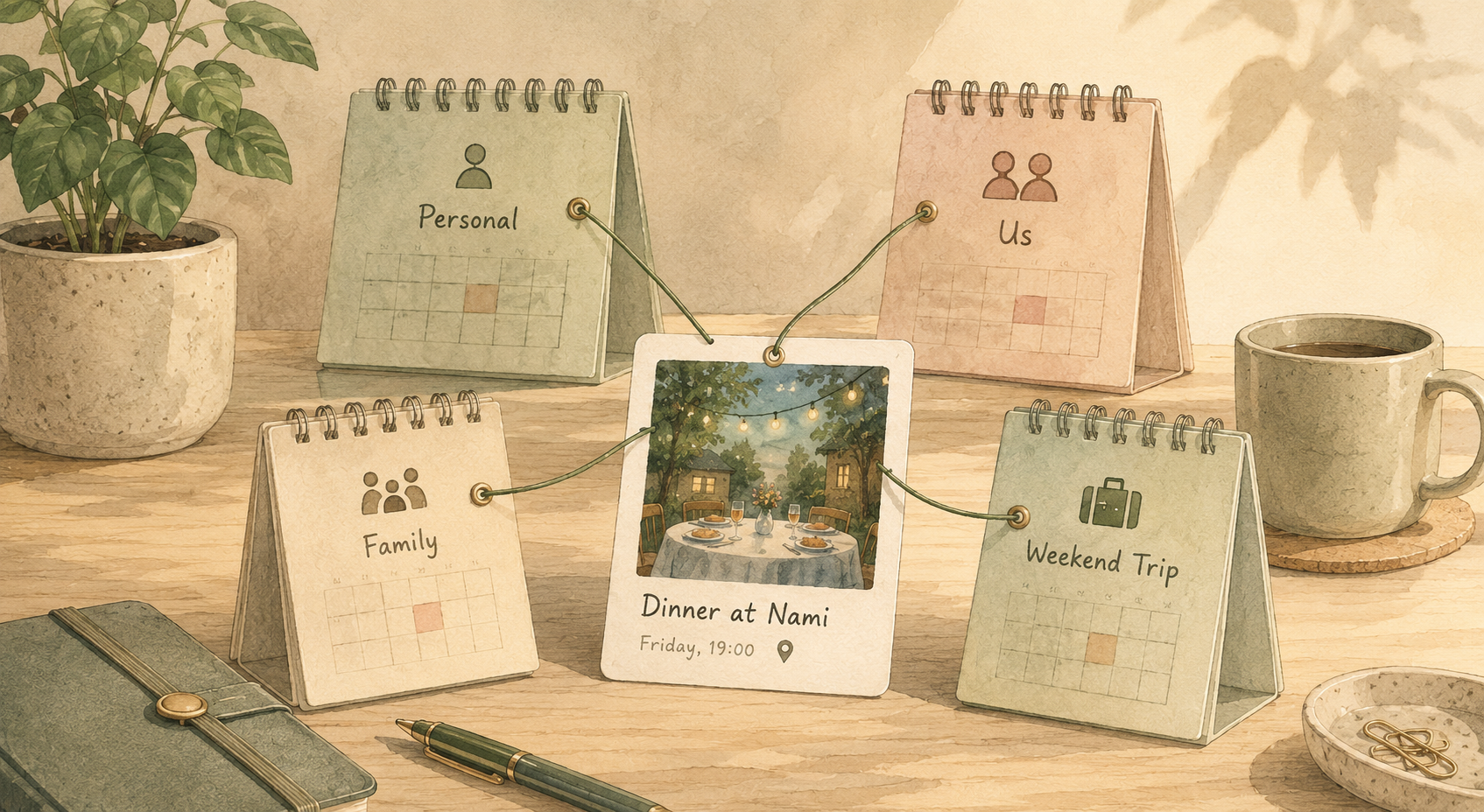
It belongs to your personal schedule because you need to be there. It belongs to the calendar you share with your partner because it is a plan you made together. If grandparents are babysitting, it may also matter to the family calendar. If the dinner is part of a weekend away, it might belong to the trip calendar too.
There is still only one dinner.
The calendar model asks you to choose one container for it. Real life does not.
The same thing happens with everyday plans:
- A school event affects a parent and the household
- A flight belongs to a personal calendar and a trip
- A doctor appointment may affect both a personal schedule and childcare
- A contractor visit belongs to the homeowner and the household
- A birthday dinner belongs to a couple and a family
- A conference can belong to both work and travel
These are not really duplicate events. They are single events with several relationships.
The usual solution is duplication
When an event needs to appear in another calendar, the obvious workaround is to copy it.
You create the dinner in Personal, duplicate it into Us and perhaps copy it again into Family. For a moment, everything looks correct.
Then the restaurant moves the reservation from 19:00 to 19:30.
Now you have to remember which copies exist and update every one of them. If only one changes, your calendars disagree.
That is the fundamental problem with duplication. Once the same real-world plan becomes several independent records, there is no inherent reason for those records to remain identical.
You have not created synchronization. You have created maintenance.
Moving an event does not solve it
Most calendar applications also let you move an event from one calendar to another.
That is useful when an event was simply created in the wrong place. It does not help when the event genuinely belongs to both.
Moving:
Dinner: Personal → Us
means the dinner no longer belongs to Personal.
You have changed the event’s container rather than expressed an additional relationship.
This reveals one of the limitations of the traditional calendar model: a calendar behaves more like a folder than a view.
An event has one home.
Invitations solve a different problem
Another option is to invite people.
Instead of copying the dinner to your partner’s calendar, you create it in your calendar and add your partner as an attendee.
For meetings, this model makes perfect sense. Invitations answer useful questions such as:
- Who organised this event?
- Who was invited?
- Who accepted?
- Who declined?
- Who should receive an update?
But not every shared plan is really a meeting invitation.
Consider events such as:
- Parents visiting
- Car at the garage
- Keep Saturday free
- School closed
- Plumber coming
- Weekend in Vienna
You may want those events to be visible in several relevant calendars without modelling everyone as an attendee who needs to accept or decline something.
A household calendar is not simply a meeting system.
Neither is a calendar shared between partners.
Calendars can represent relationships
One way to think about calendars is as categories.
You might have:
- Personal
- Work
- Family
- Travel
But calendars can also represent relationships and contexts.
For example:
- Me
- Me and my partner
- Our household
- Our family
- A trip
- A project
- A group of friends
An event can naturally belong to several of those contexts at the same time.
Consider a flight to Tokyo. It belongs to your personal calendar because you are travelling. It belongs to the calendar you share with your partner because your absence affects them. It belongs to the Japan Trip calendar because it is part of that itinerary. It may even belong to Family because relatives need to know when you arrive.
Those calendars are not four versions of the flight.
They are four different reasons to care about one flight.
What if calendars behaved more like labels?
Email provides a useful analogy.
In a folder-based system, a message normally lives in one folder. Move it somewhere else and it leaves the previous folder.
A label-based system behaves differently. One message can simultaneously be:
- Travel
- Receipts
- Important
- Japan
There is still only one underlying message. The labels simply describe different relationships to it.
Calendar software can use a similar idea.
Instead of thinking:
Calendar → contains Event
we can think:
Event ↔ linked to Calendar
The event remains the thing that actually happens. Calendars describe where that event is relevant.
One event, several calendars
Suppose Alex and Sam have a dinner reservation.
The event contains:
Dinner at Nami
Friday
19:00–21:00
Restaurant address
Reservation details
Instead of creating three records, the same event could be linked to:
- Alex
- Sam
- Us
Each calendar displays the event, but there is still only one underlying plan.
If the restaurant changes the reservation to 19:30, the event changes once. Every calendar connected to it sees the same update.
There are no internal copies that need to be kept in sync.
Linking is not the same as synchronization
There is an important distinction here.
Linking describes the internal relationship between one logical event and several calendars.
Synchronization describes communication between different calendar systems, such as:
- Google Calendar
- iCloud
- Outlook
- CalDAV
External providers have their own data models. A provider may still require an event to exist inside one particular calendar.
That means a multi-calendar internal model does not magically remove the constraints of Google, Apple or Microsoft.
It does, however, give the application a clearer source of truth before that information is translated into external calendar systems.

The origin of an event can still matter
Allowing an event to appear in several calendars introduces an obvious question: which calendar owns it?
Some concept of origin is still useful.
The origin can determine:
- Who is allowed to edit the event
- Which external provider receives changes
- Which version is authoritative during synchronization
- What happens when one calendar is disconnected
- Which calendar created the event in the first place
The important distinction is that origin does not have to mean exclusivity.
An event can originate somewhere while also being relevant elsewhere.
A photograph offers a useful comparison. One image may originate in your photo library while appearing in several albums. Adding it to another album does not create another photograph.
Calendar membership can work the same way.
Editing becomes simpler
Duplication creates an awkward question:
Which copy is correct?
Linking creates a much better question:
Who is allowed to edit this event?
That is fundamentally a permissions problem, which software already knows how to solve.
The origin calendar may control editing. Members with sufficient access may be able to change the event. Other linked calendars may simply display it.
The exact rules can differ between applications, but the important part is that conflicting copies no longer exist by default.
There is one event to edit.
Removing an event becomes more precise
Independent copies also make deletion ambiguous.
Suppose Dinner appears in Personal, Us and Family.
If you remove Dinner from the Family calendar, does that mean the dinner itself has been cancelled?
Probably not.
It may simply mean the event is no longer relevant to the Family calendar.
A linked model can distinguish between two actions:
Remove from calendar
The event continues to exist but no longer appears in that particular calendar.
Delete event
The underlying event itself is removed.
This distinction mirrors real life much more closely.
A plan can stop being relevant to one group without stopping entirely.
Shared calendars become less invasive
The same model can make sharing more private.
Imagine your personal calendar contains work meetings, medical appointments, dinners, travel, exercise and private reminders.
You do not want to expose all of that to your partner.
So you create an Us calendar.
With a traditional calendar model, you usually have to choose between:
- Moving relevant events into Us
- Copying relevant events into Us
- Inviting your partner event by event
- Sharing more of your Personal calendar than you actually want
With linked events, the decision can be much simpler.
The event remains part of your schedule, but it is also linked to the calendar you share with your partner.
You do not need to share the entire source calendar.
You only share the plans that belong to the relationship.
Recurring events make duplication even worse
One-off events are relatively easy.
Recurring events are where copies become especially painful.
Imagine:
Date night
Every Friday at 19:00
Then real life happens.
One Friday is cancelled. Another moves to Saturday. A third starts at 20:00. One week uses a different restaurant.
Recurring calendar systems usually represent this as one series with individual exceptions.
If the entire series has been copied into several calendars, each copy can develop its own exceptions. Now the calendars not only contain duplicate events; they contain duplicate recurrence rules and duplicate deviations from those rules.
That creates an uncomfortable question:
Did this exception propagate everywhere?
With a linked model, the recurrence rule and its exceptions can remain attached to one logical event while the series appears in several calendars.
One series.
Several contexts.
Copies create identity problems
Two events can look identical to a person while still being completely different records to software.
For example:
Dentist
Tuesday
14:00–15:00
If the same event has been copied into two calendars, the titles and times may match perfectly. But each copy has its own identity.
The application cannot safely assume they are the same event just because the visible information matches.
Two people could genuinely have separate dentist appointments at exactly the same time.
That is why duplicate detection is harder than comparing titles, times and locations.
The relationship needs to exist in the data model itself.
A single source of truth matters
“Single source of truth” is a phrase used constantly in software, but calendars are a good example of why it matters.
When several records represent the same real-world plan, the system eventually has to decide which version is authoritative.
That may require comparing:
- Modification times
- Provider IDs
- Organiser information
- Sync direction
- Recurrence state
- Conflict rules
When there is one logical internal event, much of that ambiguity disappears.
The event is the source of truth.
Its calendars are relationships around it.
External synchronization can still be complicated, but the application does not create extra complexity inside its own model.
The same event can mean different things to different groups
There is also a less technical benefit.
One event often matters for completely different reasons depending on the calendar.
Consider:
Mum visiting
Saturday at 11:00
For you, it is a personal plan.
For your partner, it affects the weekend.
For the household, it means somebody will be arriving.
For the family calendar, it is a family event.
Those interpretations do not conflict with one another.
They are simultaneously true.
A model with multiple calendar relationships can express that naturally.
Showing several calendars together is not the same thing
Most calendar applications already let you display multiple calendars at once.
You can show Personal, Work and Family together in the same view.
That solves a useful problem:
Show me everything happening across these calendars.
It does not solve another problem:
This particular event belongs to Personal and Family.
If independent copies of the event exist in both calendars, a combined view may even display the same real-world plan twice.
A unified interface can visually hide duplication.
It does not remove duplication from the underlying data.
Why calendars were designed this way
There are good reasons the one-calendar-per-event model became common.
It is:
- Simple
- Predictable
- Easy to explain
- Straightforward for permissions
- Compatible with established standards
- Easier to synchronize across providers
Calendar protocols and APIs have been built around these assumptions for decades.
A linked-event model introduces new questions of its own:
- What does origin mean?
- Who can edit?
- Who can unlink?
- What happens when a calendar is deleted?
- How are external copies represented?
- How do recurrence exceptions behave?
- What happens when linked calendars have different members?
So the argument is not that traditional calendars were designed badly.
The argument is that shared personal planning has different needs from many of the systems those conventions were designed for.
How Musubi approaches it
Musubi was designed around the idea that calendars often represent relationships rather than folders.
You might create:
- One calendar with your partner
- One for your household
- One with your family
- One for a trip
- One for a small group of friends
An event can then be linked wherever it is relevant instead of being manually copied into every context.
One dinner can belong to your personal calendar and the calendar you share with your partner.
One family visit can appear in both the household and family calendars.
One flight can be relevant to both you and the trip it belongs to.
The idea is simple:
One plan can matter to several people without becoming several plans.
What happens with external calendars?
External providers still have their own rules.
Google Calendar, iCloud, Outlook and CalDAV services each have their own event representations, identifiers and synchronization behaviour.
Musubi therefore needs to distinguish between:
- The logical event inside Musubi
- The Musubi calendars linked to that event
- The external provider representation used for synchronization
Musubi cannot change the internal architecture of Google Calendar or iCloud.
It can avoid copying the same limitation into its own internal model where that limitation is unnecessary.
That gives the sync layer a cleaner thing to work from: one logical event rather than several unrelated internal copies.
A different question changes the model
Traditional calendars encourage you to ask:
Where should I put this event?
A relationship-oriented calendar encourages a different question:
Who does this event matter to?
The difference sounds small, but it produces a very different model.
“Where should it go?” expects one destination.
“Who does it matter to?” may have several correct answers.
For shared calendars, the second question is often closer to how people actually think about their plans.

A calendar is a view of your life
Categories are useful.
Work is useful. Personal is useful. Family is useful. Travel is useful.
The problem appears when software assumes that because those categories are separate, the things they describe must also be separate.
Real life overlaps constantly.
A work trip is both work and travel.
A family dinner is both personal and family.
A weekend away belongs to you and your partner.
A school appointment affects a child, a parent and a household.
The event happens once.
The relationships around it are many.
Calendar software can model that distinction.
What this changes in practice
A multi-calendar event model can result in:
- Fewer duplicate events
- Fewer conflicting copies
- Simpler updates
- Clearer deletion behaviour
- More selective sharing
- Cleaner recurring events
- Better separation between private calendars and shared relationships
It does not make calendars easy.
Time zones are still difficult. Recurring events are still difficult. Permissions still matter. Synchronizing with external providers is still complicated.
But it removes one class of problem that calendar software often creates for itself: treating one real-world plan as several independent things simply because several calendars need to see it.
One event. More than one reason to care.
A dinner does not happen twice because it belongs to two calendars.
A flight does not depart twice because it matters to both your personal schedule and a trip.
A family visit does not need several identities because several people care about it.
The event is one thing.
Calendars are different ways of seeing it.
That is the distinction Musubi is built around.
Try Musubi
Musubi is an open-source, self-hostable shared calendar for partners, households, families and small groups.
Create calendars around the people you plan with and link events wherever they belong instead of maintaining independent copies.
Start with one shared calendar, read about private calendar sharing, learn why Musubi is open source, or explore the source code.
Frequently asked questions
Can one event belong to multiple calendars?
Many traditional calendar systems associate an event with one primary calendar. A calendar application can instead use an internal model where one logical event is linked to several calendar contexts.
What is the difference between linking and copying an event?
Copying creates another independent event record. Linking allows multiple calendars to reference the same underlying event, so a change only needs to be made once.
Is linking the same as inviting attendees?
No. Invitations describe who participates in an event and often include organiser and RSVP behaviour. Linking describes which calendar contexts should display the event.
Why do duplicate calendar events appear?
Duplicates often appear when the same real-world plan has been copied, imported or synchronized into several calendars as separate records.
What happens if I remove a linked event from one calendar?
A linked model can distinguish removing the event from one calendar from deleting the event itself. Removing the link means the event continues to exist elsewhere.
Does this work with recurring events?
Yes. A linked architecture can keep one recurrence series and its exceptions associated with several calendars instead of maintaining several independent recurring copies.
Does linking remove the need for calendar sync?
No. Linking is an internal data-model concept. Synchronization is still needed when communicating with external providers such as Google Calendar, iCloud, Outlook or CalDAV.
Can Musubi link one event to several calendars?
Yes. Musubi is designed so that one logical event can be linked to multiple calendar contexts instead of requiring separate independent copies.